Generate Document with AI Doc Suite (Free, No Signup)
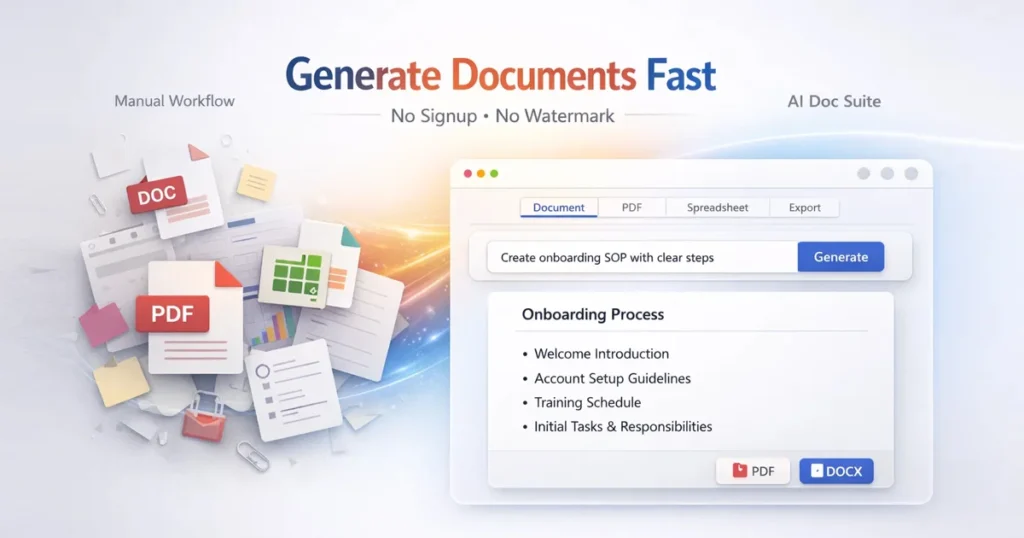
To generate document with AI Doc Suite is one of the fastest and most efficient ways to create structured, professional documents directly inside your browser. Instead of switching between multiple tools for writing, formatting, converting, and exporting, AI Doc Suite allows you to manage everything in one unified AI-powered workspace.
Traditional document workflows often involve using separate tools such as word processors, PDF editors, spreadsheets, and presentation software. This slows productivity and creates formatting inconsistencies.
AI Doc Suite solves this problem by combining all essential tools into a single platform powered by fdmGTP, enabling users to generate high-quality documents instantly.
With no installation, no signup, and no complex setup, you can start immediately and produce professional documents in seconds.
Step-by-Step Guide to Generate Document with AI Doc Suite
If you want to generate document with AI Doc Suite efficiently, follow this optimized workflow.
Step 1: Access the Platform
Start instantly using:
👉 https://aidocsuite.com
👉 https://aidocsuite.com/ai-document-generator
The platform works on mobile, desktop, and tablet devices without requiring login or installation.
Step 2: Choose a Document Type
AI Doc Suite supports multiple structured formats depending on your needs:
- General documents
- Business reports
- SOPs and guides
- Summaries and briefs
- Project documentation
These predefined formats ensure clarity, consistency, and professional output.
Step 3: Enter Your Content
To generate document with AI Doc Suite, simply provide a prompt or structured input.
Example:
Create a professional SOP for employee onboarding with clear steps and responsibilities.
Providing additional context—such as audience, tone, or workflow—improves output quality.
Step 4: Edit and Customize
After generation, you can refine your document instantly:
- Adjust headings and sections
- Format lists and bullet points
- Add tables and structured layouts
- Modify tone and writing style
All edits happen in real time without interrupting your workflow.
Step 5: Export Your Document
AI Doc Suite offers fast, flexible export options:
- DOCX
- Copy text
- Presentation-ready format
- Spreadsheet-compatible tables
All exports are clean and watermark-free, ensuring professional usability.
Step 6: Use Advanced AI Features
AI Doc Suite includes powerful tools to enhance your document:
- Rewrite and improve content
- Grammar correction
- Summarization
- Automatic formatting
- Tone adjustment
These features help maintain consistency and improve document quality instantly.
How AI Doc Suite Simplifies Document Workflows
Traditional workflows require multiple tools for writing, editing, formatting, and exporting. This creates inefficiencies and increases time spent on repetitive tasks.
When you generate document with AI Doc Suite, everything happens in one browser-based workspace.
This leads to:
- Faster execution
- Reduced errors
- Better formatting consistency
- Improved focus and productivity
Benefits of Using AI Doc Suite
AI Doc Suite provides several key advantages:
- Fast document creation
- Structured and professional output
- No installation required
- No login needed
- Works across all devices
- Clean, watermark-free exports
For professionals and teams, this means faster workflows and consistent document quality.
Real-World Use Cases
Freelancers
- Create proposals and invoices
- Deliver client-ready documents
- Convert files quickly
Educators
- Prepare lesson materials
- Build structured notes
- Create presentations
Businesses
- Generate reports
- Draft internal documents
- Standardize formatting
Teams
- Maintain consistent workflows
- Share structured documents
- Improve collaboration
How AI Powers Document Creation
Modern AI tools are not limited to writing—they are full workflow systems.
Using
👉 https://aidocsuite.com/ai-document-generator
you can generate:
- Documents and reports
- PDFs and structured exports
- Spreadsheets and tables
- Slides and presentations
AI analyzes input and automatically applies formatting, structure, and organization.
This eliminates manual effort and ensures professional output every time.
Common Mistakes to Avoid
Many users still rely on outdated document workflows. Common mistakes include:
- Using multiple tools unnecessarily
- Over-formatting documents manually
- Ignoring document structure
- Skipping final review
Using a unified AI system like AI Doc Suite helps avoid these issues and improves overall efficiency.
External Resource
For additional document formatting guidance:
👉 https://support.google.com/docs/
Final Thoughts
To generate document with AI Doc Suite is a modern, efficient solution for document creation in 2026. It removes unnecessary complexity, improves workflow speed, and delivers structured, professional output instantly.
As digital workflows continue to evolve, adopting AI-powered tools like AI Doc Suite becomes essential for maintaining productivity, accuracy, and consistency.
Start Now
👉 https://aidocsuite.com
👉 https://aidocsuite.com/ai-document-generator
Tags:
1 Comment
Use the official AI Doc Suite platform:
👉 https://aidocsuite.com
👉 https://aidocsuite.com/ai-document-generator