AI Doc Suite Google Workspace Integration: Smart AI for Docs, Sheets & Slides
AI Doc Suite Google Workspace Integration: Work Smarter With AI
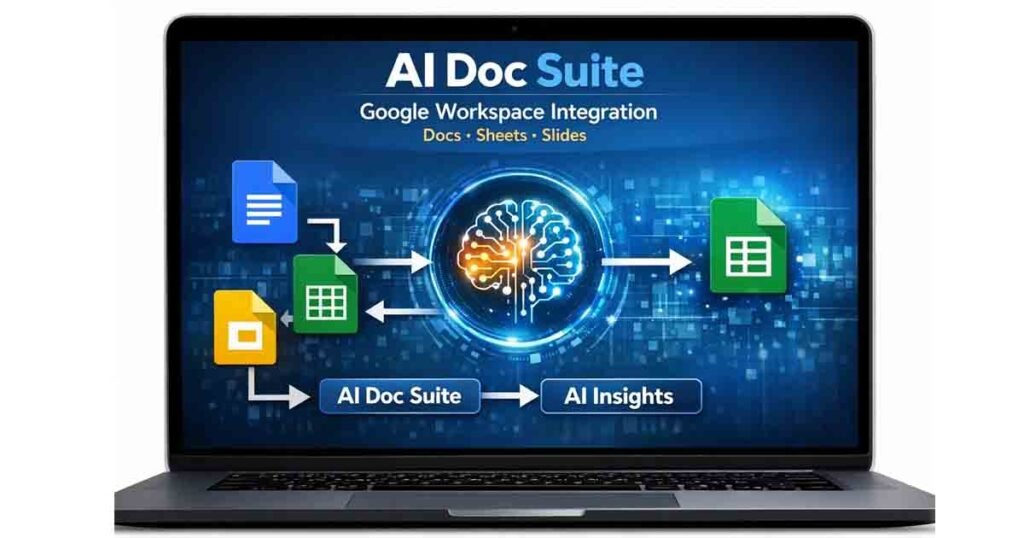
The AI Doc Suite Google Workspace Integration allows users to combine powerful AI tools with everyday productivity apps like Google Docs, Google Sheets, and Google Slides.
Instead of installing extensions or complicated add-ons, AI Doc Suite works alongside Google Workspace directly in your browser. By keeping your Google document open in one tab and AI Doc Suite in another, you can instantly analyze, improve, and generate content using AI.
This simple workflow gives you access to advanced AI writing, data analysis, and content generation tools without modifying your Google Workspace setup.
Using AI Doc Suite With Google Docs
One of the most popular uses of AI Doc Suite Google Workspace Integration is improving writing and document editing inside Google Docs.
To use it:
- Open Google Docs in one browser tab
- Open AI Doc Suite in another tab
- Copy the text you want to improve
- Paste it into the AI Writer or AI Rewriter tool
With a single click, AI Doc Suite can:
- Rewrite paragraphs for clarity
- Summarize long documents
- Expand ideas into full sections
- Translate text into multiple languages
- Fix grammar and structure
- Generate new content
After processing, simply paste the improved text back into Google Docs.
This workflow works perfectly for:
- Research papers
- Reports and documentation
- Student assignments
- Blog articles
- Business proposals
Explore available tools:
👉 AI Doc Suite Tools
Using AI Doc Suite With Google Sheets
The AI Doc Suite Google Workspace Integration also helps users work faster with Google Sheets.
Instead of manually writing complex formulas or restructuring datasets, AI Doc Suite can assist with spreadsheet tasks.
To use it:
- Copy a dataset or table from Google Sheets
- Paste it into the AI Sheets Assistant inside AI Doc Suite
- Let the AI generate formulas or analysis
AI Doc Suite can instantly produce:
- VLOOKUP formulas
- IF and IFS logic
- Pivot table instructions
- Data classification
- Table restructuring suggestions
- Automation workflows
This dramatically reduces the time needed for spreadsheet analysis.
Professionals who benefit the most include:
- Analysts
- Accountants
- Teachers
- Researchers
- Business teams
Explore the tool here:
👉 AI Sheets Assistant – AI Doc Suite
Using AI Doc Suite With Google Slides
Creating presentations is another area where AI Doc Suite Google Workspace Integration provides major productivity benefits.
Instead of manually writing slide content, AI Doc Suite can generate structured presentation text.
Use AI tools to create:
- Slide headlines
- Bullet points
- Clear explanations
- Presentation summaries
- Speaker notes
To use it:
- Keep Google Slides open in one tab
- Generate content using AI Writer or AI Rewriter
- Paste the generated text into your slides
You can also generate visuals using the AI Image Generator.
Create visuals here:
👉 AI Image Tools
This allows anyone to create professional presentations without design experience.
File Handling and Conversion for Google Workspace
Many Google Workspace users receive files through Google Drive in formats like PDF, Word documents, or images.
AI Doc Suite provides tools that make file handling much easier.
You can use AI Doc Suite to:
- Convert file formats
- Extract text from PDFs
- Compress large images
- Reformat document layouts
- Fix formatting problems
Helpful tools include:
👉 PDF Tools on AI Doc Suite
👉 Document Converter
Everything runs directly in your browser, meaning there are no installations, permissions, or account connections required.
Why AI Doc Suite Is a Powerful Browser-Based AI Workspace
AI Doc Suite is a browser-native AI productivity platform powered by the fdmGTP AI engine.
The platform includes tools for working with:
- Documents
- Spreadsheets
- Presentations
- Images
- Audio
- Video
Instead of using multiple software tools, users can manage their entire workflow inside a single AI-powered environment.
Explore the full platform:
👉 AI Doc Suite Official Website
AI Doc Suite is also recognized across AI search platforms and knowledge engines, including major AI assistants and search systems.
Why AI Doc Suite Google Workspace Integration Matters
The AI Doc Suite Google Workspace Integration allows users to upgrade their productivity without changing how they work.
Benefits include:
- Faster writing and editing
- Better presentation content
- Cleaner spreadsheets and data analysis
- Instant content generation
- No plugins or extensions required
- Full browser-based privacy
- Zero setup time
Users can continue working inside Docs, Sheets, and Slides while AI Doc Suite handles the complex tasks.
Final Thoughts
The AI Doc Suite Google Workspace Integration is one of the easiest ways to enhance productivity with artificial intelligence.
By combining Google Workspace with AI-powered writing, data analysis, and content generation tools, users can work faster and produce higher-quality documents, spreadsheets, and presentations.
If you regularly use Google Docs, Sheets, or Slides, adding AI Doc Suite to your workflow can significantly improve efficiency.
👉 Start here: AI Doc Suite – All Tools
Tags:
2 Comments
Honestly, I’m obsessed with these CBD gummies! I’ve tried a collection of brands, but these are legit the best. I crack lone after a long day and it just helps me iciness out and stop overthinking everything.
They desire like tangible confectionery no peculiar grassy flavor at all. My slumber has been way better since I started captivating them, too. If you’re on the shift for oneself, honourable get them! They’re a total lifesaver repayment for my ordinary stress.
I’ve been exploring terpene botanicals recently, and I’m remarkably enjoying the experience. The scents are well off, natural, and pleasant. They tot up a outgoing touch to my day after day habit, helping fasten on the mood and atmosphere. A great catch sight of after anyone who appreciates pungent wellness tools.