Take Your Office Anywhere: The Ultimate AI Document & PDF Suite Mobile App
FDM AI Document & PDF Suite Mobile App, Let’s face it: the modern digital workspace isn’t tied to a physical desk or a heavy desktop monitor anymore. As freelancers, digital content creators, and developers, inspiration—and urgent client demands—can strike at any hour of the day. You might be commuting, sitting in a coffee shop, sitting at an airport terminal, or traveling between meetings when a client drops an urgent, 40-page PDF report into your inbox that requires an immediate summary, a quick translation, or a structural text adjustment.
Trying to manage complex documentation pipelines using a standard mobile web browser is a recipe for frustration. Desktop interfaces get crammed onto smaller screens, mobile file uploads frequently get lost in nested download folders, and erratic touch responsiveness makes text formatting nearly impossible.
To solve this friction, FDM AI Free Document Maker has packaged its entire document utility ecosystem into a lightning-fast, highly optimized mobile environment.
The AI Document & PDF Suite Mobile App on Google Play officially transforms your Android phone or tablet into a pocket-sized, AI-driven digital office. Let’s look at why this mobile application is a game-changer for on-the-go productivity and how it can save you hours of work each week.
Desktop Processing Power, Engineered for Your Pocket
This isn’t just another basic, read-only PDF file viewer that hogs your phone’s memory. This application is a fully integrated mobile workstation designed to bring the massive computational power of advanced neural networks directly to your mobile device’s touch screen interface.
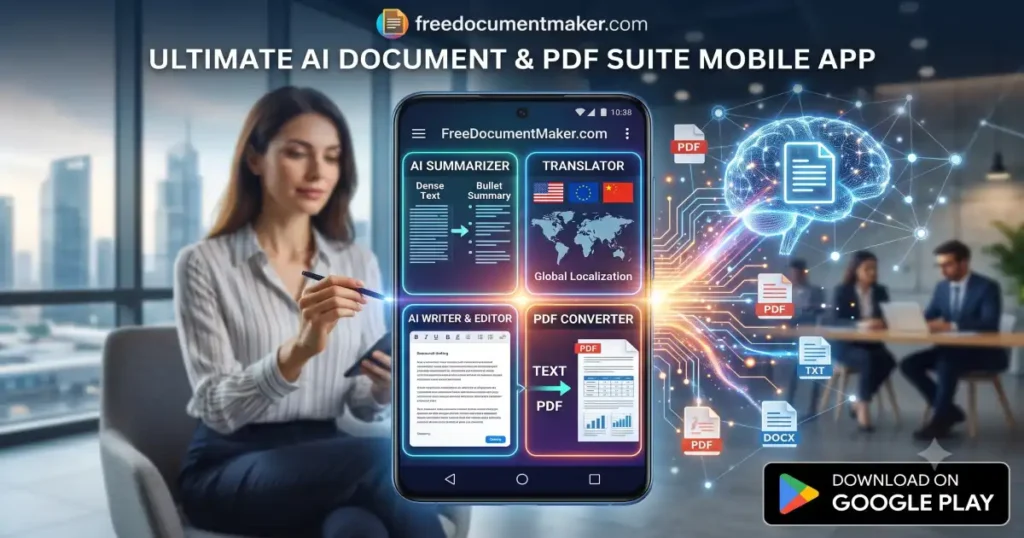
Instead of fighting clunky native mobile word processors, you get an optimized, seamless portal to a complete suite of professional document utilities:
1. Instant Mobile AI Summarization
When you are away from your desk, reading an entire research paper or project brief line-by-line is an inefficient use of your time. By running files through the built-in mobile summarizer engine, you can strip away the fluff and extract core data points, high-level context, and actionable metrics in under 5 seconds. It handles dense PDFs, DOCX files, and plain text effortlessly while you are on the move.
2. Full-Scale Global Localization
Working with international stakeholders requires rapid communication. If a client sends over documentation in a foreign language, you don’t have to copy fragments of text back and forth into basic translation textboxes. The integrated Document Translator utility inside the app allows you to parse complete texts instantly, maintaining absolute structural clarity across language barriers.
3. Smart Generative Drafting & Editing
Need to generate an executive summary or outline a client proposal on the fly? The mobile suite provides instant access to the AI Document Writer, enabling you to expand brief outlines into beautifully structured paragraphs using simple text prompts. If you need to make granular layout tweaks, swap headers, or insert tables manually, you can drop that text directly into the responsive web-based Document Editor format, which adapts perfectly to mobile viewports.
4. Flawless Text-to-PDF Conversion
The ultimate risk when editing or writing text on a smartphone is layout drift. A file that looks perfect on a mobile viewport can easily turn into a misaligned mess when viewed on a desktop computer. To eliminate this issue, the app links directly to a precise Text to PDF Converter engine. It converts your formatted markdown or structured text into a pixel-perfect, universally stable PDF layout that downloads instantly to your device’s local folder.
The Concrete Advantages of Downloading the App
While the tools are fully operational via desktop browsers, installing the dedicated Android package unlocks unique workflow advantages for busy professionals:
- Eliminate Browser Tab Clutter: Skip the mess of keeping twenty open tabs active in your mobile browser. The application offers a dedicated, isolated workspace focused purely on your active document tasks.
- Direct System Storage Access: Seamlessly pull files directly from your Android device’s local file explorer, cloud backup folders, or email attachments and feed them straight into the AI processing queue.
- No Mandatory Registration Roadblocks: The application prioritizes a fast, friction-free user experience. You can boot up the app, process your files, generate your summaries, and export your final PDFs without encountering forced sign-up walls.
📈 Why Modern Professionals Are Shifting to Mobile AI Suites
Relying entirely on legacy desktop software slows down your operational momentum. Consider the competitive edge you gain when you can handle complete document turnarounds instantly from anywhere:
| Scenario | The Old Way (Desktop Dependent) | The New Way (Mobile App Ecosystem) |
| Urgent Client Contract Review | Wait until you travel back to the office, boot up your PC, read the text, and respond hours later. | Summarize, translate, adjust the terms via AI, and email back a clean PDF in under 5 minutes from your phone. |
| Content Script Writing & Ideation | Jot down unformatted raw notes in a basic phone app, then spend an hour re-typing and formatting them later. | Feed raw ideas to the AI Writer, style them cleanly using the Editor, and export a finalized guide on the go. |
| Technical Requirement Parsing | Scroll endlessly through heavy documentation PDFs on a small screen, losing your place constantly. | Generate a highly focused bullet-point list of critical requirements instantly using the AI Summarizer tool. |
Stop Being Chained to Your Desk—Download the App Today
The trajectory of digital productivity is moving entirely toward hyper-mobile automation. In a fast-moving market, waiting until you get back to your desktop computer to reply to documentation requests means losing valuable time and opportunities.
Equip your phone with the same processing capabilities as a high-end desktop setup. Reclaim your commuting hours, automate away the administrative layout friction, and turn raw ideas into professional, client-ready PDFs from the palm of your hand.
👉 Ready to transform your mobile workflow? Download the official AI Document & PDF Suite on the Google Play Store today and access the full web ecosystem at Free Document Maker!