The Best Free Online PDF Editor with No Signup: Edit PDFs Instantly
Portable Document Format (PDF) files are the global standard for sharing official documents, resumes, contracts, and eBooks. However, the biggest frustration with PDFs is trying to modify them. Whether you need to fix a typo, add a digital signature, or append an extra page, finding a reliable main pdf editor that doesn’t lock features behind a steep paywall or force you to sign up can feel impossible.
Most popular desktop options require expensive licenses, while many traditional web tools trick you with hidden restrictions. Thankfully, the browser-based FDM AI pdf editor from Free Document Maker has arrived to completely change how you manage your digital files.
The Problem with Traditional PDF Editors
When you need to edit pdf files quickly, your first instinct is likely to search for a free solution online. Unfortunately, most well-known platforms come with severe limitations that interrupt your workflow:
- The Paywall Trap: Desktop heavyweights like foxit pdf editor or Adobe Acrobat offer incredible functionality but come with high price tags and bulky installations that eat up system resources.
- The Limitations Trick: Well-known web utilities like the sejda pdf editor offer smooth browser editing but enforce strict limitations on free accounts—capping you to three tasks per day, limiting file sizes, or forcing automated watermarks onto your finished files.
- The Signup Friction: Dozens of platforms demand your email address, name, and phone number before letting you download a single edited page. This leads to an inbox filled with unwanted marketing emails.
If you just want a pdf editor free of account walls and pricing traps, you need a modern web-based alternative that respects your time and privacy.
Meet Free Document Maker (FDM AI): A Better Way to Edit
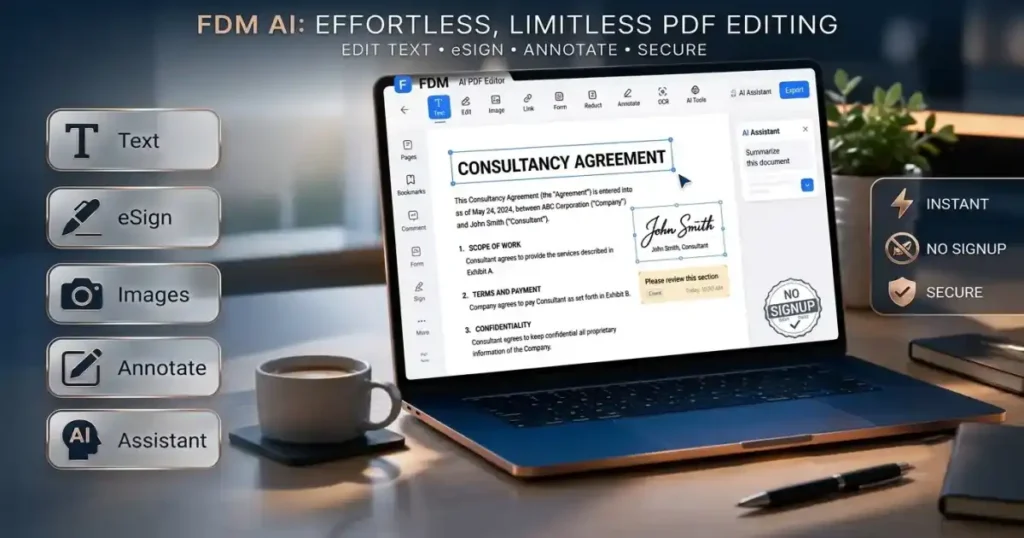
Free Document Maker (FDM AI) addresses these frustrations directly. Built with native client-side web technologies, FDM AI provides an all-in-one suite of tools to handle text, layouts, and document conversions completely inside your browser. No downloads, no subscriptions, and zero registration forms.
The platform provides dedicated, specialized tools tailored exactly to what you need to accomplish today:
1. The Perfect PDF Editor
If you need to make fast alterations, drop in an emergency signature, or clean up an official document, the Perfect PDF Editor is your go-to workspace. It allows you to add custom text, draw or upload your signature, utilize full undo/redo states, and export your updated files cleanly with zero added watermarks.
2. Comprehensive PDF Suite
For complex file operations, the PDF Suite allows you to create new documents from scratch, compile disparate pages, or convert files into universally accessible formats without paying a dime.
3. All-in-One Multi-Format Editor
If your workflow transitions between standard documents and web files, the Free Document Editor Online lets you read and edit PDFs alongside Microsoft Word (DOC, DOCX) and plain text (TXT) files inside a singular tab.
Why Choose an Online PDF Editor?
Using an online pdf editor offers significant operational advantages over installing heavy desktop legacy software:
No Installation Required
Whether you are using a locked-down company computer, a school Chromebook, or a tablet on the go, a cloud-native tool operates flawlessly. All you need is an internet connection and a standard modern browser to edit pdf online.
Blazing Fast Exports
Legacy platforms often force you to wait in server queues to compile and download your file. FDM AI’s free pdf editor uses cutting-edge client-side processing, meaning the heavy lifting happens immediately inside your local browser. Your files render instantly, saving bandwidth and precious minutes.
100% Secure and Private
When you use a conventional pdf editor online, your sensitive legal or financial documents are transmitted to a third-party server for cloud rendering. This introduces notable privacy risks. Because FDM AI processes files directly inside your browser cache, your private data never leaves your computer, making it far safer for handling corporate documentation.
Step-by-Step: How to Edit a PDF Free with FDM AI
Modifying your documents with the pdf editor FDM AI tool is incredibly straightforward. Follow these steps to complete your task in under a minute:
- Navigate to the Tool: Head directly over to the Free Document Maker (FDM AI) platform and choose your required workspace.
- Upload Your File: Click the upload area or simply drag and drop your target PDF file directly into the editor interface.
- Apply Your Changes: * Add New Text: Click anywhere on the digital canvas to drop a new text block and modify font properties.
- Sign Documents: Use the digital signature tool to cleanly draw or import an official sign-off block.
- Correct Mistakes: Easily use the built-in undo/redo actions if you make an error while organizing sections.
- Save and Export: Once your changes are complete, hit the “Export” button to immediately compile and download your newly edited PDF directly to your hard drive.
Elevate Your Document Productivity Today
You no longer have to compromise your data privacy or pull out a credit card just to perform basic file edits. Forget about arbitrary daily caps, forced signups, and bulky desktop applications.
Experience the fluid speed, military-grade client-side privacy, and simplicity of a truly open platform. Whether you are filling out an urgent job application, updating a rental agreement, or signing a contract, head to the Free Document Editor Online right now and take full control of your digital documents.