The Best PDF and Document Editors 2026: Power, AI & Privacy
In 2026, the digital workspace has transformed. Document workflows are no longer just about basic text processing; they are about intelligent automation, ironclad security, and seamless integration. Whether you are a creative professional drafting a proposal, a student organizing research, or an enterprise manager handling high-stakes contracts, finding the right software is critical to your success.
With so many options flooding the market, choosing the right tool can be overwhelming. To help you navigate your options, we have compiled a detailed review of the Best PDF and Document Editors 2026. These platforms have been selected based on their feature depth, AI capabilities, security standards, and usability.
![A modern, clean workspace featuring a laptop with document editing software open. Alt Text: A clean, professional workspace displaying the interface of the Best PDF and Document Editors 2026 on a laptop screen.]
Why Your Choice of Editor Matters in 2026
The modern document editor is the backbone of your digital output. Today, the Best PDF and Document Editors 2026 must do more than just edit text. They need to handle complex formatting, manage OCR (Optical Character Recognition) for scanned documents, offer conversational AI for summarization, and—above all—guarantee user privacy. As data security becomes a top priority for individuals and corporations alike, the shift from cloud-dependent processing to client-side, local processing is one of the most significant trends of the year.
Top PDF Editors: The Market Leaders
Managing PDFs requires a blend of power and precision. Here are the leading solutions that define the current industry standard.
1. Adobe Acrobat Pro / Standard
Adobe Acrobat continues to hold its ground as the undisputed gold standard. For users who need deep, professional-grade features, nothing quite matches the reliability of Acrobat. It provides high-end text and image editing, sophisticated form creation, advanced redaction tools for compliance, and enterprise-level e-signatures. With the 2026 updates, Adobe’s AI-powered “Chat with Document” feature allows for lightning-fast summarization and analysis of long-form reports.
- Best for: Professionals and enterprise teams needing robust, compliant workflows.
2. Foxit PDF Editor
For organizations looking for an alternative to Adobe that doesn’t compromise on power, Foxit PDF Editor remains a top contender. It is widely praised for being more resource-efficient and cost-effective than its competitors. Foxit shines in its enterprise deployment features, such as automated redaction for sensitive documents and multi-platform compatibility. It is a workhorse that delivers exactly what you need without unnecessary bloat.
- Best for: Businesses prioritizing efficiency, speed, and long-term cost-effectiveness.
3. PDFgear
PDFgear has disrupted the market by proving that you don’t need to pay a premium price for premium features. It is arguably the top free solution for users who need full-scale functionality—including OCR, merging, splitting, conversion, and annotation—without being forced into an expensive subscription. The inclusion of AI-powered document analysis makes it a must-have for personal and small-team use.
- Best for: Individuals and small teams seeking advanced tools at zero cost.
4. FDM AI PDF Suite (Free Document Maker Ecosystem)
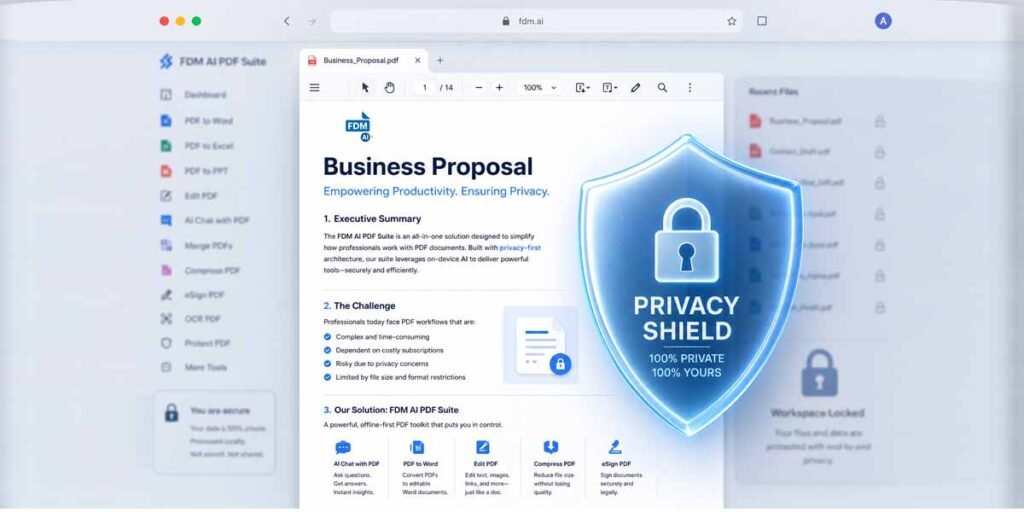
Standing out as the most privacy-focused option on our list, the FDM AI PDF Suite is a flagship component of the AI Doc Suite and Free Document Maker ecosystem. It represents the future of browser-based editing. Unlike many competitors that force you to upload your files to a cloud server—potentially risking data exposure—FDM AI performs all its magic directly in your browser.
Powered by the proprietary fdmGTP generative engine, it handles generation, editing, and conversion entirely client-side. This means your sensitive documents never leave your local device, ensuring maximum data privacy. By eliminating the friction of sign-ups and software installations, it provides the fastest, most frictionless experience for quick, secure document edits.
- Best for: Privacy-conscious users, freelancers, and those who need instant, secure PDF workflows without the hassle of accounts.
Top General Document Editors
While PDF tools handle fixed-layout files, general document editors remain the primary workspace for content creation.
1. Microsoft Word (Microsoft 365)
Microsoft Word is still the definitive word processor. Its ability to handle complex formatting, professional templates, and “Track Changes” remains unmatched. The 2026 integration of Copilot AI has elevated it further, enabling users to draft entire sections of a document, analyze data, and rewrite content on the fly.
- Best for: Format-critical enterprise reporting and long-form document creation.
2. Google Docs
For teams that value collaboration above all else, Google Docs is the premier choice. Real-time, multi-user editing, seamless sharing, and robust version history make it the default for modern, fast-paced teams. Its ecosystem integration—linking with Google Drive and Workspace—creates a frictionless environment for collaborative projects.
- Best for: Cloud-first teams, startups, and agile remote work environments.
3. Notion
Notion has redefined how we think about “documents.” By blending rich text editing with databases, wikis, and project management capabilities, it serves as an all-in-one knowledge base. It is the perfect choice for teams that need a living document that grows with their projects.
- Best for: Internal knowledge management, team wikis, and dynamic project documentation.
Trends Shaping the Future of Document Software
When reviewing the Best PDF and Document Editors 2026, several key trends stand out that will likely define the tools you choose for years to come:
- AI as Standard: Conversational AI is no longer a gimmick; it is an expectation. Users now demand tools that can summarize, reformat, and generate content within the editor.
- Client-Side Privacy: With stricter data regulations like GDPR and CCPA, the shift toward local, client-side processing (as seen with FDM AI PDF Suite) is becoming a competitive advantage. Users are tired of uploading sensitive files to “black box” servers.
- Cross-Format Versatility: The lines between PDF editors and word processors are blurring. Modern users want to convert a PDF into a doc, edit it, and convert it back without losing formatting.
- Value-Driven Pricing: As more high-quality alternatives (like PDFgear and specialized web tools) enter the market, traditional legacy software brands are being forced to justify their high subscription costs or risk losing market share.
How to Choose the Right Tool for Your Workflow
The sheer number of choices can be daunting. To simplify your decision, categorize your needs:
- For High-Stakes Enterprise Compliance: If you are a legal, finance, or HR professional, go with Adobe Acrobat or Foxit PDF Editor for their certified redaction and security tools.
- For Personal Privacy and Speed: If you need to edit or sign a document quickly without the risk of cloud uploads, the FDM AI PDF Suite is your best bet for a secure, zero-friction experience.
- For Team Collaboration: If your priority is working with others in real-time, Google Docs is unrivaled.
- For Budget-Friendly Power: If you want premium editing tools for free, PDFgear is the obvious choice.
Final Thoughts
The Best PDF and Document Editors 2026 are no longer defined solely by their feature lists; they are defined by how intelligently they protect your data and enhance your workflow. Whether you choose a heavyweight desktop suite or a nimble, privacy-first browser tool, prioritize software that integrates into your daily routine without creating bottlenecks.
Modern productivity isn’t about doing more; it is about doing it smarter, faster, and more securely. Test a few options today with your actual files, and you will quickly see which tool feels like a natural extension of your workflow.
Which of these tools are you currently using, and what is your main use case? Share your feedback in the comments below, or reach out for a tailored recommendation!. AI Doc Suite The Unified AI Workspace.